What Is AI Phishing and How to Recognize It?
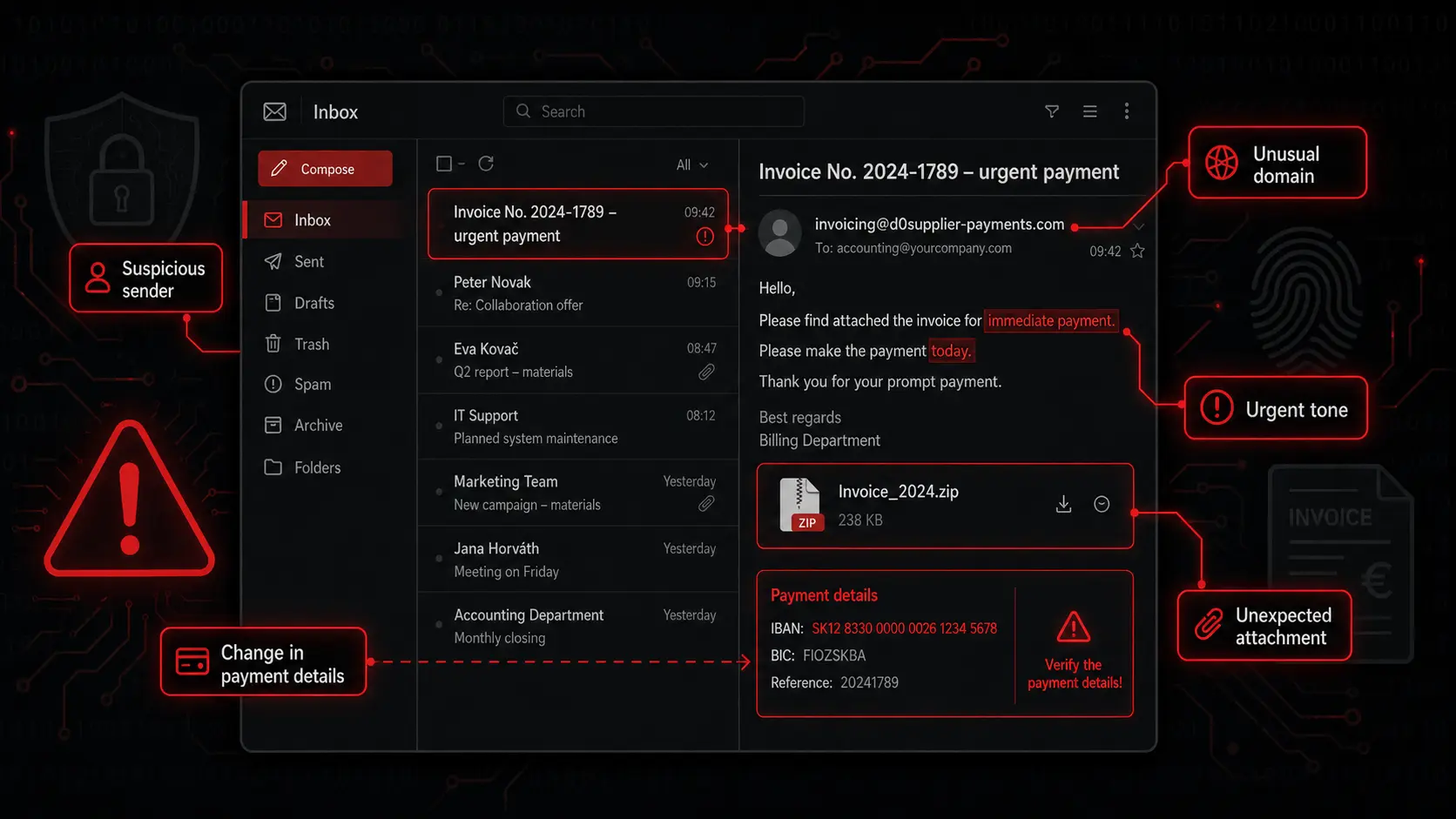
An accountant receives an email: "Hello, we are sending the corrected invoice for March. Please pay it by the end of the day so we do not have to suspend delivery." The message is polite, has no typos, mentions a real supplier and even uses the right signature. Nothing screams "scam".
In the past, phishing was often easy to spot. The message had strange language, bad formatting, an unknown sender and an unprofessional look. Today the situation is different. Artificial intelligence can help attackers write messages that look natural, convincing and personal.
AI phishing is phishing strengthened by artificial intelligence. It does not mean the whole email was written by a robot. It means an attacker can use AI to write text, translate, personalize, create false stories, imitate communication style or prepare an entire phishing campaign.
For a broader view of how attackers use AI beyond phishing, read our article AI as an Attacker: Phishing, Deepfakes and New Cyber Threats.
Phishing often connects with other social engineering techniques. For voice-based attacks, read deepfake scams and vishing; for personalized lures based on public data, read AI and OSINT.
How phishing works
Phishing is based on a simple principle: the attacker pretends to be someone trustworthy.
They may impersonate a bank, delivery company, mobile operator, public authority, well-known company, colleague, manager or customer. The message usually pushes you to act quickly.
Common goals of phishing are to:
- make you click a link,
- send you to a fake login page,
- convince you to open an attachment,
- steal payment details,
- get a verification code,
- convince you to make a payment,
- gain access to a company system.
The biggest problem is that phishing often does not look dramatic. Sometimes it looks like a completely ordinary work message.
The most common types of phishing
Email phishing
The best-known form. You receive an email that looks like it came from a bank, courier, Microsoft, Google, supplier or colleague. It contains a link, attachment or request for quick action.
Example: "Your password will expire soon. Sign in and confirm your account."
Smishing
Smishing is phishing through SMS or chat apps. It often uses messages about packages, payments, fines or bank accounts.
Example: "Your package is waiting for a 1.99 EUR payment. Click here."
Vishing
Vishing is phishing by phone. The attacker calls and tries to convince you to do something. They may pretend to be a bank employee, technical support, police officer, courier or manager.
With AI, vishing is more dangerous because attackers can use a synthetic or cloned voice.
Spear phishing
Spear phishing is targeted phishing. It is not a random message sent to thousands of people. It is prepared for a specific person or company.
The attacker can research your name, role, projects, colleagues, clients or suppliers. Then they create a message that feels like it belongs in your workday.
This is where OSINT becomes important: public profiles, company websites and posts can turn a generic phishing message into a believable spear-phishing pretext.
Business Email Compromise
This attack often targets companies. The attacker pretends to be a CEO, manager, supplier or business partner and tries to convince an employee to pay an invoice or change a bank account.
It is not always a technical attack. Very often it is well-prepared manipulation.
How AI changes phishing
AI makes phishing better in the worst possible way.
Better grammar
Scam messages no longer need to contain bad translations. AI can write natural language and adapt the tone so the message sounds like a bank, courier, authority or colleague.
More personal details
An attacker can review public information about a company and its people. AI can then turn it into a message with specific context.
For example: "Hi Martina, I am sending the updated documents for the tender you are working on this week." This is much more dangerous than generic spam.
Faster campaign preparation
AI can create dozens of message variants for different departments: finance, HR, sales or IT.
Better style imitation
If an attacker has public texts from a specific person, they can try to imitate the style. The message may then sound like normal communication from a manager or colleague.
Checklist: how to recognize phishing
When you receive a suspicious message, slow down. You do not have to be an IT expert. Ask a few simple questions.
1. Is the message pushing me to act quickly?
Phishing often uses time pressure: "immediately", "within 24 hours", "final notice", "urgent" or "your account will be blocked". The stronger the pressure, the more you should verify.
2. Does it ask for a password, code or payment?
Never send passwords or verification codes by email, SMS or chat. If someone asks for an SMS code, treat it as a major warning sign.
3. Is the sender address correct?
Check not only the display name but also the email address. An attacker can use the name of a familiar brand while the real address is completely different. Watch for small domain changes, swapped letters, hyphens or suspicious endings.
4. Does the link lead where it claims?
Do not click automatically. On a computer, hover over the link to see where it leads. On mobile this is harder, so be even more careful. It is safer to open the official website manually.
5. Was the attachment expected?
Do not open attachments you were not expecting, especially invoices, documents, archives or files that ask you to enable macros or sign in again.
6. Does the context make sense?
Ask yourself: Was I expecting this message? Does it make sense that this person is writing to me? Is it normal for them to request this action? If not, verify it.
7. Can I verify the request through another channel?
For payments, account changes, access requests and sensitive data, always verify through another channel. Call a known number, use internal chat or ask in person.
What to do if you clicked a phishing link
Anyone can click. The important part is not to panic and to act quickly.
If you only clicked a link but did not enter anything, close the page and report the message to IT or your administrator. If you entered a password, change it immediately. If you reuse that password elsewhere, change it there as well. If you entered card details, contact your bank. If this involved a company account, inform your company immediately.
The worst option is staying silent because of fear or embarrassment. Attackers count on people hiding incidents. Fast reporting can save an account, money and company data.
How to protect yourself long term
Use multi-factor authentication (MFA). Update your devices. Do not reuse the same password everywhere. Use a password manager. Be careful on public Wi-Fi. Most importantly, verify suspicious requests.
In companies, regular training, easy reporting of suspicious messages, simulated phishing tests and clear rules for payments or bank account changes help a lot.
Conclusion
AI phishing is dangerous because it looks normal. It does not need to be technically spectacular. It uses ordinary communication, ordinary stress and ordinary trust.
The best defense is simple: slow down, verify, do not click automatically and do not give in to pressure. If a message creates panic, urgency or asks for sensitive data, pay attention.